Create Realz Casino Mobile Shortcut - Premium Access Guide
Experience instant premium gaming access with your Realz Casino mobile shortcut NZ - just one tap away! Creating a personalized home screen shortcut delivers lightning-fast access to all your premium games, exclusive promotions, and advanced account features. Follow our comprehensive step-by-step guide to add Realz Casino to your mobile device's home screen for the ultimate gaming convenience.
iOS Safari Shortcut Installation
Transform your iPhone or iPad into a premium realz mobile app download experience:
Comprehensive iOS Setup Process:
- Launch Safari browser and navigate to realzcasino.co.nz
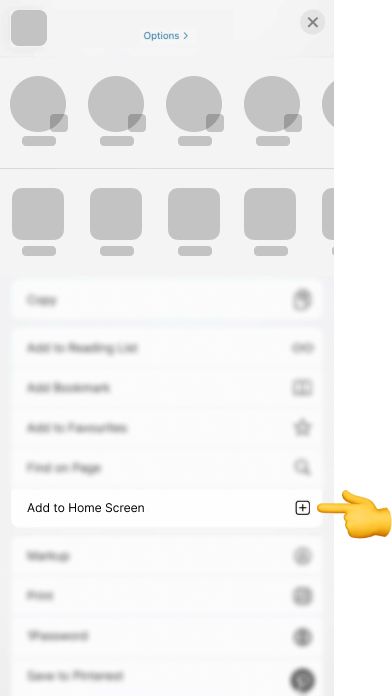
- Tap the Share icon (square with upward arrow) in the bottom toolbar
- Scroll down and select "Add to Home Screen" from the options
- Customize the shortcut name (we recommend "Realz Casino Premium")
- Tap "Add" in the top-right corner to complete installation
- Locate your premium shortcut on the home screen featuring the Realz Casino logo
Premium iOS Benefits:
• Full-screen immersive gaming without browser navigation bars
• Enhanced loading performance superior to traditional bookmarks
• Push notification integration for exclusive promotions and offers
• Seamless iOS ecosystem integration with native device features
• Premium app-like experience without App Store download requirements
Your casino shortcut new zealand will deliver a sophisticated, native app experience while providing instantaneous access to our complete premium gaming platform.
Android Chrome Shortcut Configuration
Establish your realz home screen app on Android devices with premium functionality:
Detailed Android Instructions:
- Open Chrome browser and visit realzcasino.co.nz
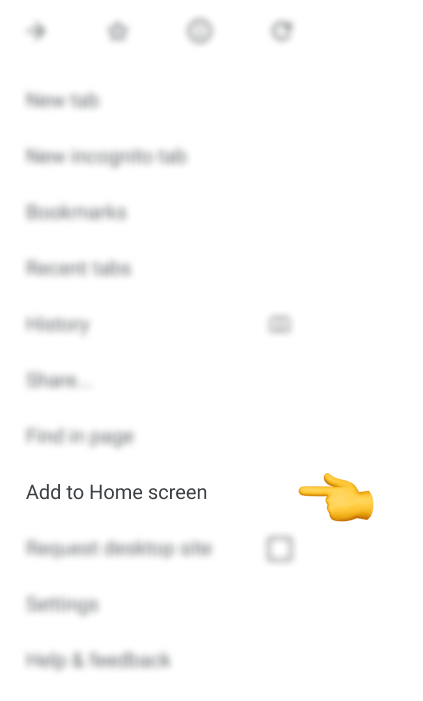
- Tap the three-dot menu located in the top-right browser corner
- Select "Add to Home screen" from the dropdown menu options
- Confirm the application name (default: "Realz Casino")
- Tap "Add" to initiate shortcut creation
- Choose "Add to Home screen" when system prompts appear
- Access your premium shortcut from home screen or app drawer
Alternative Installation Method:
• Look for the "Add to Home screen" banner appearing at the page bottom
• Tap "Add" when the system prompt appears
• Follow the automated setup process for seamless installation
Advanced Android Features:
• Progressive Web App (PWA) technology for enhanced performance
• Offline game caching capabilities for uninterrupted gaming
• Native Android system integration with device features
• Background promotional updates for exclusive offers
• Hardware acceleration support for ultra-smooth gameplay
Premium Mobile Shortcut Advantages
Why establish a mobile casino access realz shortcut for optimal gaming?
Instant Premium Access:
• One-touch entry to your premium account dashboard
• Eliminate URL typing or bookmark searching processes
• Immediate access to live casino experiences
• Quick verification of current jackpots status
Enhanced Gaming Experience:
• Full-screen premium gaming without browser interface distractions
• Superior load times compared to traditional browser bookmarks
• App-style navigation and premium user interface design
• Optimized touch controls specifically for mobile gaming excellence
• Enhanced device notification integration for superior user experience
Premium Convenience Features:
• Automatic login session retention for seamless access
• Quick access to exclusive promotions
• Streamlined deposit and withdrawal processes for efficient banking
• Instant customer support access through help centre
Advanced Security Advantages:
• Direct encrypted connection to official Realz Casino website
• Zero third-party app store vulnerabilities for enhanced protection
• Automatic security update deployment for continuous protection
• Device-level security integration utilizing built-in protection systems
Technical Support & Troubleshooting
Shortcut Functionality Issues:
• Verify stable internet connectivity (minimum 5Mbps recommended)
• Clear browser cache and stored cookies for optimal performance
• Update browser to latest available version for compatibility
• Restart device after shortcut creation to ensure proper integration
Missing Icon Resolution:
• Realz Casino logo should display automatically upon installation
• Delete and recreate shortcut if icon doesn't appear correctly
• Ensure access through official realzcasino.co.nz domain
• Close background applications to maximize available system memory
• Verify internet speed (minimum 3Mbps recommended for premium gaming)
• Switch between WiFi and mobile data to optimize connection stability
Advanced Support Options:
Require additional assistance? Contact our premium support team through the casino app shortcut ios android setup process or visit our comprehensive help centre for detailed technical guidance.
Mobile Gaming Optimization Tips
• Enable hardware acceleration in browser settings for smoother gameplay
• Close unnecessary background apps to free up processing power
• Use WiFi connections when available for stable gaming sessions
• Keep device battery above 20% for optimal performance during extended play
Security Best Practices:
• Only use official realzcasino.co.nz domain for shortcut creation
• Enable device screen lock for additional account security
• Avoid public WiFi for banking transactions and deposits
• Keep your mobile browser updated for latest security features
Create Your Premium Shortcut Today
Transform your mobile device into the ultimate realz quick access nz gaming portal! Experience premium casino entertainment with unmatched convenience wherever your adventures take you.
Start your premium gaming journey - Create your Realz Casino mobile shortcut now and unlock instant access to New Zealand's premier mobile casino experience!
Realz Casino NZ - Where premium mobile gaming meets unparalleled convenience for discerning New Zealand players.

.webp)
.webp)